引言:AppFlowy-Cloud踩坑,原先是想用appflowy的,无奈cloud本地部署踩坑太多,此前对于docker-compose配置不太熟悉,故AI咋说我咋做,一做一个不吱声😭
首先:认识docker-compose
可以通过docker-compose文件直接将所需的docker镜像安装、配置部署。
具体教程可直接参考:
Docker 一键部署 AFFiNE 教程:开源 Notion + Miro 替代,打造私有知识库
1 搭建方式
1.1 安装docker和docker-compose
1.2 获取 Docker Compose 文件和.env文件
#定义了 AFFiNE 容器、端口映射和卷挂载
wget -O docker-compose.yml https://github.com/toeverything/affine/releases/latest/download/docker-compose.yml
#自动下载示例 .env 文件
wget -O .env https://github.com/toeverything/affine/releases/latest/download/default.env.example1.3 修改docker-compose.yml和.env配置
通用配置:
(仅需要添加DB数据库密码配置即可)
.env文件
# select a revision to deploy, available values: stable, beta, canary
AFFINE_REVISION=stable

# set the port for the server container it will expose the server on
PORT=3010

# set the host for the server for outgoing links
# AFFINE_SERVER_HTTPS=true
# AFFINE_SERVER_HOST=affine.yourdomain.com
# or
# AFFINE_SERVER_EXTERNAL_URL=https://affine.yourdomain.com

# position of the database data to persist
DB_DATA_LOCATION=~/.affine/self-host/postgres/pgdata
# position of the upload data(images, files, etc.) to persist
UPLOAD_LOCATION=~/.affine/self-host/storage
# position of the configuration files to persist
CONFIG_LOCATION=~/.affine/self-host/config

# database credentials
DB_USERNAME=affine
DB_PASSWORD=affine
DB_DATABASE=affine
docker-compose.yml文件
name: affine
services:
  affine:
    image: ghcr.io/toeverything/affine:${AFFINE_REVISION:-stable}
    container_name: affine_server
    ports:
      - '${PORT:-3010}:3010'
    depends_on:
      redis:
        condition: service_healthy
      postgres:
        condition: service_healthy
      affine_migration:
        condition: service_completed_successfully
    volumes:
      # custom configurations
      - ${UPLOAD_LOCATION}:/root/.affine/storage
      - ${CONFIG_LOCATION}:/root/.affine/config
    env_file:
      - .env
    environment:
      - REDIS_SERVER_HOST=redis
      - DATABASE_URL=postgresql://${DB_USERNAME}:${DB_PASSWORD}@postgres:5432/${DB_DATABASE:-affine}
      - AFFINE_INDEXER_ENABLED=false
    restart: unless-stopped

  affine_migration:
    image: ghcr.io/toeverything/affine:${AFFINE_REVISION:-stable}
    container_name: affine_migration_job
    volumes:
      # custom configurations
      - ${UPLOAD_LOCATION}:/root/.affine/storage
      - ${CONFIG_LOCATION}:/root/.affine/config
    command: ['sh', '-c', 'node ./scripts/self-host-predeploy.js']
    env_file:
      - .env
    environment:
      - REDIS_SERVER_HOST=redis
      - DATABASE_URL=postgresql://${DB_USERNAME}:${DB_PASSWORD}@postgres:5432/${DB_DATABASE:-affine}
      - AFFINE_INDEXER_ENABLED=false
    depends_on:
      postgres:
        condition: service_healthy
      redis:
        condition: service_healthy

  redis:
    image: redis
    container_name: affine_redis
    healthcheck:
      test: ['CMD', 'redis-cli', '--raw', 'incr', 'ping']
      interval: 10s
      timeout: 5s
      retries: 5
    restart: unless-stopped

  postgres:
    image: pgvector/pgvector:pg16
    container_name: affine_postgres
    volumes:
      - ${DB_DATA_LOCATION}:/var/lib/postgresql/data
    environment:
      POSTGRES_USER: ${DB_USERNAME}
      POSTGRES_PASSWORD: ${DB_PASSWORD}
      POSTGRES_DB: ${DB_DATABASE:-affine}
      POSTGRES_INITDB_ARGS: '--data-checksums'
      # you better set a password for you database
      # or you may add 'POSTGRES_HOST_AUTH_METHOD=trust' to ignore postgres security policy
      POSTGRES_HOST_AUTH_METHOD: trust
    healthcheck:
      test:
        ['CMD', 'pg_isready', '-U', "${DB_USERNAME}", '-d', "${DB_DATABASE:-affine}"]
      interval: 10s
      timeout: 5s
      retries: 5
    restart: unless-stopped
1.4 启动dokcer
# 启动docker
docker compose up -d

# 重启docker
docker compose stop
docker compose start

# 升级docker
docker compose down
docker compose pull
docker compose up -d
1.5 访问AFFiNE

然后自行创建用户
(设置中文)
更多使用跟介绍可以看看官方文档:https://docs.affine.pro/self-host-affine/administer/indexer
遗留问题
用户无法通过自行通过邮箱注册账号,只能在管理员界面新建用户
发送验证码邮件时,affine-sever日志会显示SMTP——500的错误码
迁移Affine服务
- 需备份好以下三个文件夹,然后迁移:
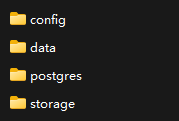
- 需保持数据库账号密码一致,否则无法访问(其他默认)
- 新服务器登录直接使用原来设置的账号
AI服务:
当前使用国内转接:poloai。参考以下配置gemini:
{
"model":"gemini-2.0-flash",
"apiKey":"sk-************",
"baseURL":"https://poloai.top/v1"
}